Building a Minimal Container Runtime
Have you ever wondered how Docker works under the hood? Containers have revolutionized software development, but their inner workings can seem mysterious. In this blog post, I'll walk you through a minimal container runtime I built called "smol-docker" that demonstrates the core concepts of containerization in just a few hundred lines of Go code.
What is smol-docker?
smol-docker is a lightweight container runtime I wrote in Go that can pull and run Docker images. I built it for educational purposes—both to deepen my own understanding of containers and to help other developers learn about container fundamentals without the complexity of a full-featured container engine like Docker or containerd.
Despite its simplicity, smol-docker implements the basic building blocks of containerization:
- Image pulling and extraction
- Filesystem isolation
- Process isolation (on Linux)
- Cross-platform support (Linux and macOS)
While I definitely don't recommend it for production use, it provides a clear view of how container runtimes work at their core.
How Containers Work: The Basics
Before diving into the code, let's understand what containers actually are. When I started this project, one of my first realizations was that containers are not lightweight VMs—they're isolated processes running on the host operating system. This distinction is crucial.
A container runtime needs to provide:
- Filesystem isolation: Each container sees its own filesystem
- Process isolation: Processes in one container can't see processes in another
- Resource constraints: Limiting CPU, memory, etc. (I didn't implement this in
smol-docker) - Networking: Isolated network stack (also not implemented in
smol-docker)
Here's a visual representation of how containers achieve isolation:
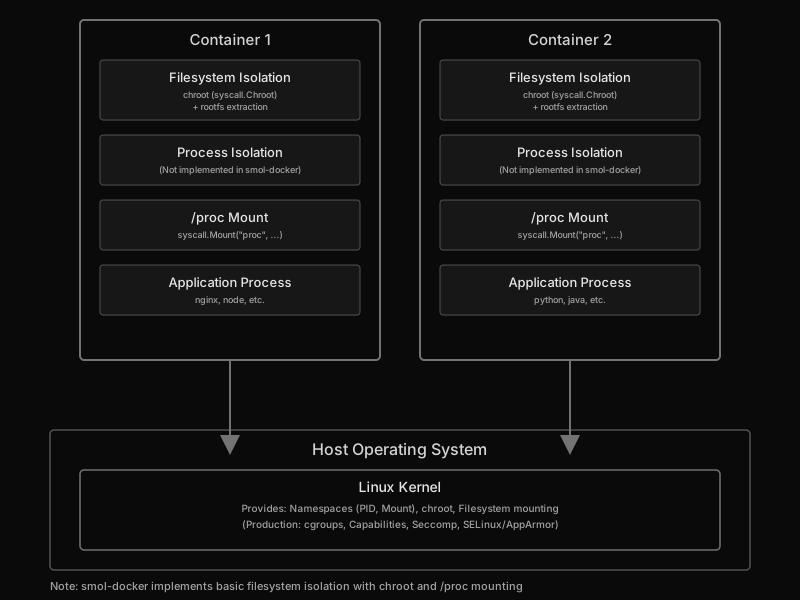
Figure: Container isolation architecture showing how multiple containers share the same kernel while maintaining isolation.
Building smol-docker: The Core Components
Let's explore how I implemented these concepts:
1. Project Structure
I kept the project structure simple and flat:
smol-docker/
├── main.go         # Core container runtime implementation
├── linux.go        # Linux-specific container isolation features
├── pull.sh         # Script to extract Docker images
├── Makefile        # Build and distribution management
├── go.mod          # Go module definition
├── go.sum          # Go module checksums
└── README.md       # Project documentation
2. Pulling Docker Images
The first step in running a container is getting the image. Initially, I considered implementing the Docker Registry API from scratch, but I quickly realized that was overkill for an educational project. Instead, I created a simple shell script (pull.sh) that leverages Docker's CLI to pull and export images:
#!/bin/bash

set -e

defaultImage="hello-world"
folder="dumps"

image="${1:-$defaultImage}"
imageFolder="${folder}/${image}"

mkdir -p ${folder}

if [ -d "$imageFolder" ]; then
    echo "Folder '$imageFolder' already exists"
else
    echo "Creating image-specific folder '$imageFolder'..."
    mkdir -p ${imageFolder}
fi

container=$(docker create "$image")

docker export "$container" -o "./${imageFolder}/${image}.tar.gz" > /dev/null

docker inspect -f '{{.Config.Cmd}}' "$image:latest" | tr -d '[]\\n' > "${imageFolder}/${image}-cmd"

docker rm "$container" > /dev/null

echo "Image content stored in ${imageFolder}/${image}.tar.gz"
echo "Command configuration stored in ${imageFolder}/${image}-cmd"
echo "Done."
This script:
- Creates a temporary container from the specified image
- Exports the container's filesystem as a tar archive
- Extracts the default command from the image
- Cleans up the temporary container
3. Container Representation
In main.go, I defined a simple Container struct to represent our container:
type Container struct {
    Image   string
    Command string
    RootDir string
    TempDir string
}
This struct holds everything needed to run a container—the image name, the command to execute, where the dumps are stored, and where we'll extract the image.
4. Setting Up the Container
The Setup method prepares the container environment:
func (c *Container) Setup() error {
    tempDir, err := c.createTempDir()
    if err != nil {
        return fmt.Errorf("failed to create temp directory: %w", err)
    }
    c.TempDir = tempDir

    tarPath := filepath.Join(c.RootDir, fmt.Sprintf("%s.tar.gz", c.Image))
    if err := c.unpackImage(tarPath); err != nil {
        return fmt.Errorf("failed to unpack image: %w", err)
    }

    return nil
}
This creates a temporary directory and extracts the container image into it. I learned that having a clean temporary workspace is essential for container isolation.
5. Running Containers on Linux
The real magic happens in the Linux-specific implementation (linux.go), which uses two key kernel features. This is where I had my biggest "aha!" moments about how containers actually work.
Filesystem Isolation with chroot
func (c *Container) changeRoot() error {
    oldRoot, err := os.Open("/")
    if err != nil {
        return fmt.Errorf("failed to open root: %w", err)
    }
    defer oldRoot.Close()

    cmd := exec.Command(c.Command)
    cmd.Stdin = os.Stdin
    cmd.Stdout = os.Stdout
    cmd.Stderr = os.Stderr

    if err := syscall.Chdir(c.TempDir); err != nil {
        return fmt.Errorf("failed to change directory: %w", err)
    }

    if err := syscall.Chroot(c.TempDir); err != nil {
        return fmt.Errorf("failed to chroot: %w", err)
    }

    if err := cmd.Run(); err != nil {
        log.Printf("Command failed: %v", err)
    }

    // Return to the original root
    if err := syscall.Fchdir(int(oldRoot.Fd())); err != nil {
        return fmt.Errorf("failed to restore old root directory: %w", err)
    }

    if err := syscall.Chroot("."); err != nil {
        return fmt.Errorf("failed to restore old root: %w", err)
    }

    return nil
}
I chose to use chroot for filesystem isolation because it's straightforward and doesn't require kernel namespace features. The chroot system call changes the root directory for the current process, making it impossible to access files outside the new root. This provides basic filesystem isolation.
Mount Namespace for /proc
func (c *Container) setupMounts() error {
    procPath := filepath.Join(c.TempDir, "proc")
    if err := os.MkdirAll(procPath, 0755); err != nil {
        return fmt.Errorf("failed to create proc directory: %w", err)
    }

    if err := syscall.Mount("proc", procPath, "proc", 0, ""); err != nil {
        return fmt.Errorf("failed to mount proc: %w", err)
    }

    return nil
}
This mounts a new /proc filesystem inside the container, which I discovered is essential for many Linux applications to function correctly. Without this, even simple commands would fail.
6. Cross-Platform Support (macOS)
One of the biggest challenges I faced was making smol-docker work on macOS. Since macOS doesn't support the same isolation primitives as Linux (no chroot, no mount namespaces), I had to get creative with a simulated environment:
func (c *Container) runMacOS() error {
    // For macOS, we'll use a simpler approach that doesn't require root privileges
    // We'll just run the command in the extracted directory with modified environment

    // Make the command path relative to the extracted directory
    cmdPath := c.Command
    if filepath.IsAbs(cmdPath) {
        cmdPath = filepath.Join(c.TempDir, cmdPath[1:])
    } else {
        cmdPath = filepath.Join(c.TempDir, cmdPath)
    }

    // Check if the file exists and is executable
    if _, err := os.Stat(cmdPath); os.IsNotExist(err) {
        return fmt.Errorf("executable not found in container: %s", cmdPath)
    }

    // Try to execute the command
    cmd := exec.Command(cmdPath)
    cmd.Stdin = os.Stdin
    cmd.Stdout = os.Stdout
    cmd.Stderr = os.Stderr

    // Set the working directory to the extracted image
    cmd.Dir = c.TempDir

    // Set environment variables to simulate container environment
    cmd.Env = append(os.Environ(),
        "CONTAINER=true",
        "HOME="+filepath.Join(c.TempDir, "home"),
        "PATH="+filepath.Join(c.TempDir, "bin")+":"+os.Getenv("PATH"),
    )

    if err := cmd.Run(); err != nil {
        // Handle various error cases...
        if err.Error() == "exec format error" {
            return fmt.Errorf("cannot run Linux binaries on macOS. Please use Docker Desktop or a Linux VM to run containers")
        }
        return fmt.Errorf("command failed: %w", err)
    }

    return nil
}
This macOS implementation doesn't provide true isolation, but it taught me a lot about what real isolation requires. It simulates a container-like environment by:
- Setting the working directory to the extracted image
- Configuring environment variables to mimic a container
- Detecting when users try to run Linux binaries on macOS
The last point was important—I wanted users to get a clear error message rather than cryptic failures.
Using smol-docker
Let me show you how to use the container runtime I built:
Building the Project
First, clone and build the project:
git clone https://github.com/smol-go/smol-docker.git
cd smol-docker
make build
Pulling an Image
To download a Docker image:
./smol-docker pull nginx
This will:
- Create a container from the nginx image
- Export its filesystem to
./dumps/nginx/nginx.tar.gz - Extract the default command to
./dumps/nginx/nginx-cmd
Running a Container
To run the container:
./smol-docker run nginx
Or with a custom command:
./smol-docker run nginx /bin/bash
How It All Works Together
Let me trace through what happens when you run a container with smol-docker:
- Argument Parsing: The
parseArgs()function extracts the command, image name, and optional command.
func parseArgs() (string, string, string, error) {
    if len(os.Args) < 2 {
        return "", "", "", fmt.Errorf("insufficient arguments")
    }

    command := os.Args[1]

    if command != "run" && command != "pull" {
        return "", "", "", fmt.Errorf("invalid command: %s", command)
    }

    if len(os.Args) < 3 {
        return "", "", "", fmt.Errorf("image name required")
    }

    image := os.Args[2]
    var cmd string

    if command == "run" {
        if len(os.Args) > 3 {
            cmd = os.Args[3]
        } else {
            cmdFile := filepath.Join(dumpsDir, image, fmt.Sprintf("%s-cmd", image))
            buf, err := os.ReadFile(cmdFile)
            if err != nil {
                return "", "", "", fmt.Errorf("failed to read command file: %w", err)
            }
            cmd = string(buf)
        }
    }

    return command, image, cmd, nil
}
- Image Pulling: The
pullImage()function calls the shell script to download and extract the image. - Container Setup: The
Setup()method creates a temporary directory and unpacks the image. - Platform Detection: The code checks the operating system and uses the appropriate isolation method.
- Container Execution: On Linux, it uses
chrootand mount namespaces. On macOS, it simulates a container environment. - Cleanup: After execution, the temporary directory is removed.
What I Learned: Security in Production Containers
While building smol-docker, I gained a deep appreciation for what production container runtimes actually do for security. My implementation only scratches the surface with basic chroot and mount namespace isolation.
In production container runtimes, multiple isolation mechanisms work together:
- Namespaces: Isolate processes, networks, mounts, users, etc. (I only used mount namespaces)
- Capabilities: Limit what privileged operations a process can perform (not implemented)
- Seccomp: Filter system calls to reduce attack surface (not implemented)
- AppArmor/SELinux: Mandatory access control systems (not implemented)
This multi-layered approach is why production containers are actually secure, while smol-docker is emphatically not suitable for anything beyond learning and experimentation.
What I Left Out (And Why)
I deliberately kept smol-docker minimal to focus on the core concepts. Here's what I didn't implement and why:
Network Isolation: Adding network namespaces would have doubled the complexity. For understanding the basics, filesystem and process isolation are sufficient.
Resource Limits (cgroups): While cgroups are crucial for production, they're more about resource management than isolation. I wanted to focus on the "what is a container" question first.
User Namespaces: Running containers as non-root is important for security, but it adds another layer of complexity that would obscure the fundamentals.
Image Layers: Docker's layered filesystem with overlayfs is clever, but understanding a single unpacked filesystem is easier for learning purposes.
Multi-process Support: Real containers run init systems and multiple processes. I kept it to one process to keep the code simple.
What's Next
If I continue working on this project, here are some features I'm considering:
- Network namespaces for true network isolation
- Basic cgroups to show resource limiting
- User namespaces for better security
- A simple layer system using overlayfs
But honestly, the current version achieves its goal: helping people (including myself) understand how containers work at a fundamental level.
If you fork this project, these would be great features to add as learning exercises. Each one teaches something different about Linux kernel features and container isolation.
Conclusion
Building smol-docker helped me demystify how containers work. At their core, containers are just processes with enhanced isolation provided by Linux kernel features.
My key takeaways from this project:
- Containers are not VMs: They're isolated processes sharing the host kernel—this seems obvious now, but implementing it made the difference crystal clear
- Isolation is multi-layered: Filesystem, process, network, and resource isolation work together in production systems
- Platform-specific: Full container isolation relies heavily on Linux kernel features. The macOS version taught me just how much we take for granted on Linux
- Simplicity is powerful: Even a basic implementation can demonstrate core container concepts effectively
By understanding these fundamentals, I now have a much deeper appreciation for what container technologies like Docker, containerd, and Kubernetes are doing behind the scenes.
If you're interested in exploring container internals, I encourage you to fork smol-docker and experiment with it. Try adding some of the missing features, or dive into the source code of more complete container runtimes like runc or crun.
Happy containerizing!
Want to explore the code? Check out the full source code on GitHub.